Series “A Kubernetes cluster with a GPU for LLM inference”
- Deploying an immutable Kubernetes cluster with Talos on Proxmox (this article)
- Passing an NVIDIA GPU through to a Kubernetes cluster
- Running a Kubernetes cluster with GitOps and Flux (in progress)
- Self-hosted LLM inference on Kubernetes (in progress)
Introduction
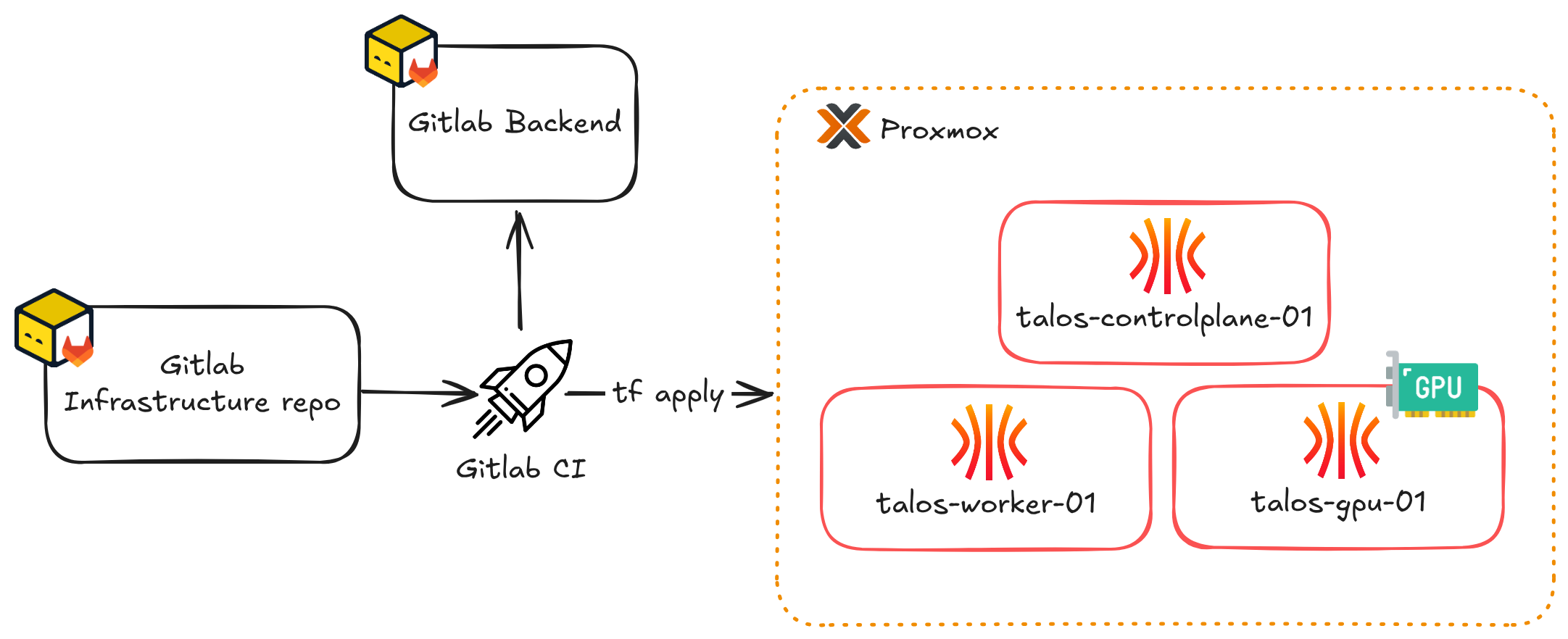
After deploying a Kubernetes cluster on Proxmox with Kubespray, I wanted to fix something that bothered me: maintaining the OS underneath the cluster. In this article, I start over from scratch with Talos Linux, an immutable distribution dedicated to Kubernetes, which I provision entirely with OpenTofu.
This article is the first of a series whose end goal is to run LLM inference locally, on a GPU passed through to the cluster. The aim is to train myself in MLOps and in deploying AI workloads on Kubernetes. The cluster described here is the foundation, so it already includes a node intended for the GPU.
Context
My previous article covered deploying a Kubernetes cluster with Kubespray. The result was reproducible, but the automation stopped at the OS: the three Debian VMs were still regular systems, with their package updates, their SSH access and a configuration that could drift between two runs of the playbook.
With Talos, the OS can no longer be administered directly: there is no shell, no SSH and no package manager. The only interface is a gRPC API, and the whole machine is described by a YAML configuration file applied declaratively. To change a node, I change its configuration and Talos applies it.
Talos is not better than Kubespray in absolute terms. I lose the ability to step in by hand on a node, but in exchange I know that no node has been changed outside of the code.
Components
| Component | Version | Role |
|---|---|---|
| Proxmox | 9.1 | Hypervisor |
| Talos Linux | 1.13.8 | Node OS |
| Kubernetes | v1.36.2 | Orchestrator |
| OpenTofu | 1.11.5 | VM creation and Talos configuration |
bpg/proxmox provider | 0.114.0 | Drives Proxmox |
siderolabs/talos provider | 0.12 | Drives Talos |
| OpenTofu GitLab CI component | 4.5.0 | Deployment pipeline |
| Cilium | 1.20.2 | CNI, replaces kube-proxy |
I chose OpenTofu over Terraform to stay consistent with my stance on open source software and licences. Since HashiCorp moved Terraform to the BUSL licence in 2023, OpenTofu is the fork that remains under the MPL 2.0 licence. Its development is also driven more by feature requests from the community, while Terraform’s is geared towards HashiCorp’s Enterprise and Cloud offerings, which I have no interest in.
Talos Linux
Talos is a Linux distribution that only contains what is needed to run Kubernetes: a kernel, its own init system, containerd and the cluster components. A few of its properties explain most of the choices made in the rest of the article:
- The root filesystem is read-only, mounted from a squashfs image. Data that must persist (etcd, container images) is written under
/var, on a dedicated partition. So there is nowhere to drop a binary or edit a configuration file by hand. - Updates follow an A/B scheme. The new version is installed next to the running one, and if the update fails, the node can reboot into the old one.
- There is no systemd. The kubelet, etcd, containerd and the Talos API are managed by
machined, and their configuration comes entirely from the machine config. You cannot add a service or override one. - Administration goes exclusively through a gRPC API, exposed on port
50000of each node with mutual TLS authentication. Thetalosconfigfile used bytalosctlcontains the cluster CA and a client certificate, and without this file a Talos node refuses any connection.
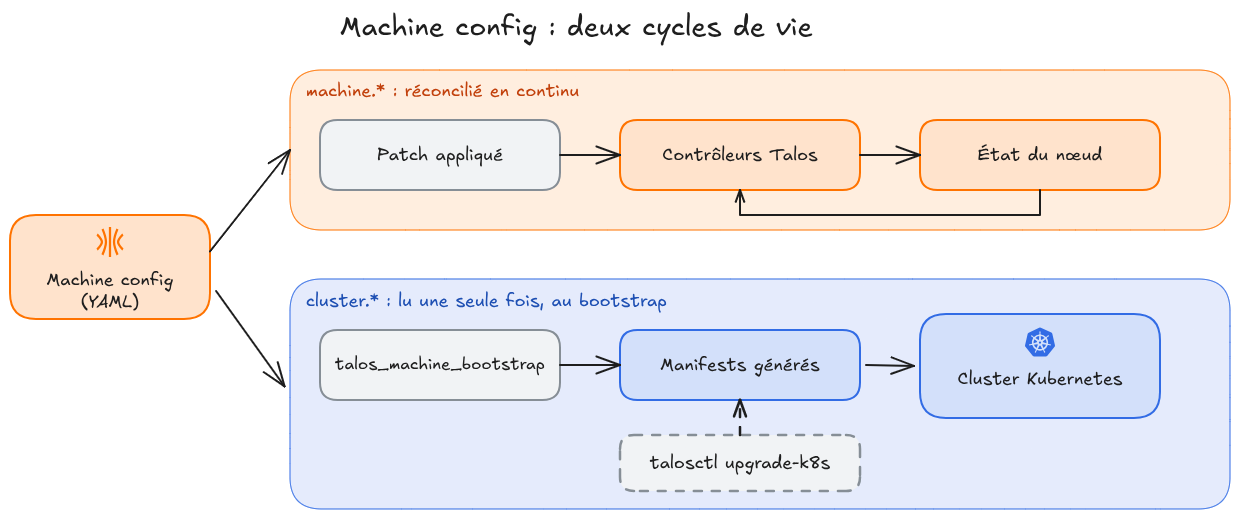
The entire configuration of a node therefore fits in a single YAML file, the machine config, which has two main sections: machine.* for the node itself (network, disks, kubelet, kernel modules) and cluster.* for the Kubernetes cluster (CNI, kube-proxy, extra manifests).
Machine configuration and cluster configuration
These two sections live in the same file, but they are not applied the same way:
machine.*is reconciled continuously. Talos controllers watch the configuration and adjust the state of the node. A patch that changesmachine.networkormachine.kubeletis applied immediately, sometimes after restarting the service involved.cluster.*is only read at bootstrap. Duringtalos_machine_bootstrap, Talos generates Kubernetes manifests from this section and applies them to the cluster. The section then stays in the configuration, but it is never read again.
In practice, changing cluster.network.cni.name on a cluster that is already running does not remove the CNI in place, and Talos shows no error and no warning. The manifests generated from cluster.* are only replayed, removing those that are no longer generated, during a talosctl upgrade-k8s.
The two lifecycles of the machine config
Target architecture
| Role | Hostname | VM ID | IP | vCPU | RAM | Disk |
|---|---|---|---|---|---|---|
| Control plane | talos-controlplane-01 | 121 | 192.168.1.121 | 2 | 4 GB | 50 GB |
| Worker | talos-worker-01 | 122 | 192.168.1.122 | 4 | 8 GB | 100 GB |
| GPU worker | talos-gpu-01 | 123 | 192.168.1.123 | 4 | 12 GB | 100 GB |
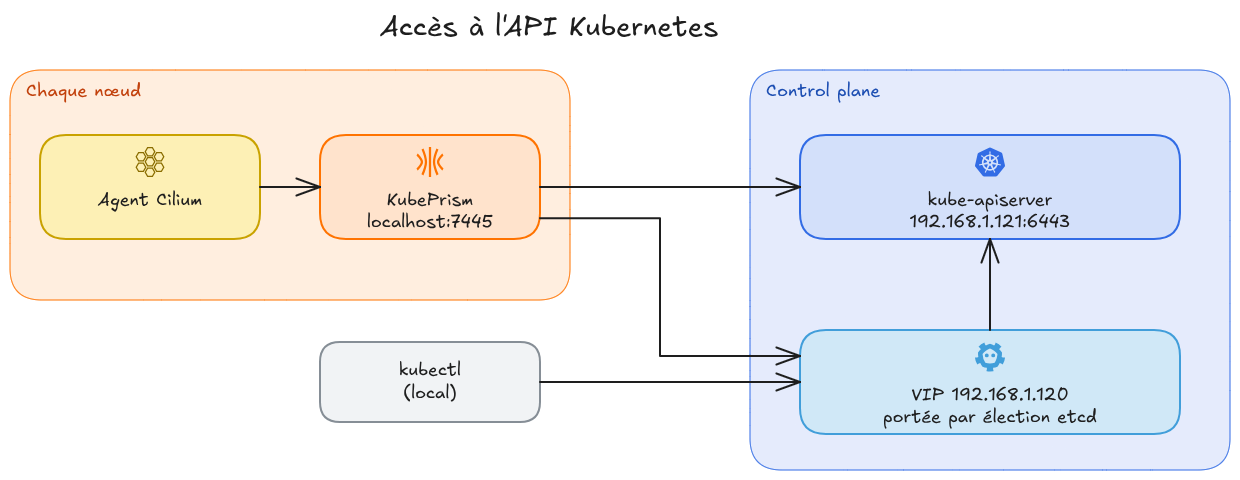
The Kubernetes API does not answer on a node IP but on a VIP, 192.168.1.120. This address is reserved, which is why the nodes start at .121.
NoteThere is only one control plane, as in my Kubespray article, and for the same reason: it is a homelab. I still configured the VIP from the start, because it is written into the configuration of every node, and setting it up later would mean reconfiguring the whole cluster.
A GPU node declared from the start
The third node is called talos-gpu-01, even though no graphics card is used in this article. It already differs from the other two in three ways:
- 12 GB of RAM instead of 8. PCI passthrough requires ballooning to be disabled, so this memory will be permanently reserved on the host. I preferred to size the node accordingly right away.
- A different Talos image. The NVIDIA modules are provided by system extensions, which are built into the image when it is created. This node therefore has its own image.
- A configuration patch that only applies to it. Loading the NVIDIA modules on a node without a card produces an error at every boot.
This last point affects how the configuration is organised: as soon as one node differs from the others, a per-role configuration is no longer enough. I describe the solution in the section on patches.
Provisioning with OpenTofu
The images: Talos Image Factory
A Talos image cannot be modified afterwards. To add qemu-guest-agent or the NVIDIA modules, you need an image that already contains them, and that is the job of the Image Factory: you send it a list of extensions, and it returns a schematic ID, a hash that identifies this list. This hash is then used to build the image URL for any Talos version.
| Schematic | Extensions | Nodes |
|---|---|---|
ce4c9805... | qemu-guest-agent | controlplane-01, worker-01 |
a31d81ec... | qemu-guest-agent, nvidia-open-gpu-kernel-modules-production, nvidia-container-toolkit-production | gpu-01 |
The downloaded image is a compressed raw disk, nocloud-amd64.raw.xz. It changes two things compared to my previous deployments:
nocloudis the target platform. With it, Talos reads its initial network configuration from the cloud-init drive provided by Proxmox, which makes the node reachable from the first boot, before it has received its machine config.- There is no template anymore. My Debian VMs are cloned from a template built with Packer, whereas the Talos nodes import this image directly as their
scsi0disk. So I no longer have a template to rebuild for this cluster: to change the Talos version, I change a variable.
The download uses a for_each over the schematics actually in use, which avoids downloading the same image twice when several nodes share the same schematic:
| |
The image is downloaded as .raw.xz, while decompression_algorithm is set to zst. The provider only accepts gz, lzo, zst and bz2, but Proxmox’s zst decompression can also handle an xz archive. This behaviour is not documented, I found it in a bpg provider discussion about xz-compressed images.
The topology in a variable
The whole cluster topology is described in a single variable. To add a node, you just add an object to this list:
| |
I added more validations than usual on this variable, five in total:
rolemust becontrolplaneorworker- hostnames must be unique
- IPs must be unique
- there must be at least one
controlplane - the VIP must not match a node IP
Without these validations, each of these mistakes would show up in the middle of an apply, as an unclear Proxmox API error, with part of the infrastructure already created. With them, the error is caught at plan time, before anything is changed. A sixth validation comes in part 2, to check that each hostpci.mapping matches a declared mapping.
The VMs
A single resource creates the three nodes:
| |
- There is no
cloneblock. The system disk is the image downloaded above, referenced by itsfile_id, and that is what replaces the template. machine = "q35"andbios = "ovmf"with anefi_disk. The VMs boot in UEFI, and the OVMF firmware needs an EFI disk to store its variables.- The
vm_idis derived from the last octet of the IP.192.168.1.123gives VM 123, which lets me map the Proxmox interface to the network directly. floating = 0disables ballooning, which is mandatory for the GPU node in part 2.
NoteThe cloud-init drive of a Talos node is not used to configure Talos. It only gives the node a static IP at first boot, so that it is reachable in maintenance mode. All the configuration is then applied through the Talos API, via the
siderolabs/talosprovider.
The VMs are ready to boot, now they need their configuration.
The machine configuration
Generating the secrets and the base configuration
The siderolabs/talos provider chains six resources, in this order:
| |
talos_machine_secrets generates all the cryptographic material of the cluster: the Kubernetes, Talos and etcd CAs, and the node enrolment tokens. These secrets are never written to disk, they are stored in the OpenTofu state and only leave it through outputs.
The bootstrap and the kubeconfig retrieval have no for_each, because they are operations on the whole cluster. They target a single control plane, the first one in the list:
| |
The talos_machine_configuration_apply resource gets its node argument from the talos_nodes variable, not from a VM attribute. OpenTofu therefore sees no dependency between the two, and may try to apply the configuration to an IP that does not answer yet. So I added an explicit depends_on on the VMs:
| |
Patches, on three levels
A list of patches per role is no longer enough as soon as a single node has specific hardware. So I organised the patches on three levels, from the most general to the most specific:
| |
The list of patches for each node is built with fileset:
| |
This relies on three properties of fileset:
- Files are sorted alphabetically, so the numeric prefix of each file sets the merge order. For a given key, the last patch wins: the node level overrides the role level, which overrides the common level. I leave gaps in the numbering (10, 20, 30) so I can insert a patch later.
- A missing directory returns an empty set, without error. All three levels are therefore optional, which is handy since Git does not track empty directories.
- Adding a patch requires no code change. You just drop a file in the right directory,
talos.tfstays the same.
The GPU node is what led me to create the nodes/ level: an NVIDIA patch placed under worker/ would also be applied to talos-worker-01, whose image does not contain the extensions, and that node would fail to load the modules at every boot.
The VIP
Talos manages the VIP itself, without keepalived or an external load balancer. The control planes choose the node that holds the VIP through an election in etcd: only one holds it at any given time, and it fails over automatically to another control plane if that node goes away.
| |
The interface is declared again in full, not just completed with a vip entry. The machine config takes precedence over the network configuration provided by the nocloud platform: a patch that only contained the VIP would wipe out the static addressing provided by the cloud-init drive, and the node would become unreachable.
cluster_endpoint also points to the VIP, not to a node IP. This value is written into the configuration of every node and into the kubeconfig: if it designated a specific node, losing that node would cut off access to the API, and adding a control plane would mean reconfiguring the whole cluster to change the endpoint.
CNI and kube-proxy disabled
| |
By default, Talos installs Flannel as the CNI and kube-proxy. I replace both with Cilium, so I disable them.
I chose Cilium for three reasons: it replaces kube-proxy, it handles L2 announcements, which I use later in the series to announce the IPs of LoadBalancer services on my local network, and it is all built on eBPF, a technology I want to rely on as my homelab evolves.
This choice has two consequences:
- the nodes stay
NotReadyas long as no CNI is installed, which is expected - without kube-proxy, the CNI has to reach the API server directly, because the ClusterIP of the
kubernetes.defaultservice is not routable yet when it starts. That is the job of KubePrism, which I present in the section on Cilium.
This patch is placed on the control planes because these manifests are generated at bootstrap, from a control plane. Like everything under cluster.*, it only has an effect at that moment: applied to a cluster that is already running, it removes nothing.
Kubelet serving certificates
By default, the kubelet exposes its :10250 endpoint with a self-signed certificate that no cluster CA recognises. Hence the --kubelet-insecure-tls option found in most metrics-server installations: the client does not verify the server certificate, so any machine able to get in the middle on the network can pretend to be a kubelet.
The first part of the solution is on the node side:
| |
With this option, the kubelet no longer generates a self-signed certificate and sends a CSR to the API server, with the kubernetes.io/kubelet-serving signer. The problem is that Kubernetes never automatically approves CSRs for this signer. The kube-controller-manager can sign the certificate, but no cluster component approves it: the CSRs stay Pending and the kubelet keeps its self-signed certificate. This is a deliberate choice of the Kubernetes project, which leaves that decision to each environment.
The second part is therefore on the cluster side:
| |
kubelet-serving-cert-approver is a controller that approves these CSRs. It only approves them: the signing is still done by the kube-controller-manager, with the cluster CA key. Before approving a request, it checks that it really matches a kubelet’s:
- the subject organisation is
system:nodes - the CN starts with
system:node:and exactly matches the user who submitted the CSR - the requested usages are those of a server certificate
- the request contains no email or URI SAN
However, it does not check that the IP addresses requested in the SANs actually belong to the node, since its ClusterRole gives it no access to Node objects. A node already enrolled in the cluster can therefore obtain a valid certificate for another node’s IP.
The security gain is real but limited: before, any machine on the network could pretend to be a kubelet, whereas now you need the identity of a cluster node. In my case, metrics-server now verifies the kubelet certificates against the cluster CA, without --kubelet-insecure-tls.
Both manifests must stay deployed permanently, because certificate rotation is continuous and each renewal produces a new CSR to approve. The URLs are pinned to a specific version, so that a re-apply does not fetch different content and so that Renovate can track updates.
The configuration is complete, I can move on to the deployment.
Deployment
I do not run any apply locally. The deployment goes through a GitLab CI pipeline that uses the GitLab OpenTofu component:
| |
The validate-plan-apply template adds four jobs: fmt and validate in the validate stage, plan in build, then apply in deploy. By default, apply only exists on the default branch and must be started by hand: a merge request therefore stops at the plan, and nothing is applied until I trigger the job.
The rest of the configuration comes down to five points:
- The jobs run on my own runner, thanks to the
homelabtag: a GitLab runner with the Docker executor, hosted on my Proxmox. It is on the same network as the Proxmox API, which GitLab’s shared runners could not reach. - The state is managed by GitLab. The
backend "http" {}block inproviders.tfis empty, and the component fills in the project’s state address and the job credentials at run time. - The secrets stay in GitLab. The Proxmox API token and the SSH key are CI/CD variables, passed to OpenTofu through the
TF_VAR_*variables. - The pipeline only runs if
tofu/changes, thanks to theworkflowrule. - Versions are tracked by Renovate, thanks to the
# renovate:comments above the component.
Retrieving the credentials
The cluster credentials are not written anywhere on disk, they are in the state, so they have to be extracted through the outputs. Since the state is stored in GitLab, I run a local tofu init once, only for this step. GitLab provides the full init command under Operate > Terraform states, with the Copy Terraform init command action. I then retrieve both files:
| |
The talosconfig generated by data.talos_client_configuration contains two lists: the endpoints, which talosctl actually connects to and which only contain control planes, and the nodes, which are the default targets of commands and are reached through an endpoint. This is what lets you query a worker without connecting to it directly.
For example, to list the services of talos-worker-01:
| |
talosctl opens the connection to the control plane 192.168.1.121, which relays the request to the worker 192.168.1.122. Without -e, the endpoints from the talosconfig are used, and -n is enough to change the target.


Endpoint and node with talosctl
Installing Cilium
The cluster starts without a CNI, so the nodes are NotReady. I install Cilium with Helm, as a replacement for kube-proxy:
| |
| |
The cgroup and securityContext values are specific to Talos. By default, the chart mounts the cgroup2 itself and runs the agent in privileged mode, which Talos does not allow. I took the list of capabilities from the Talos documentation for Cilium rather than rebuilding it.
That leaves the k8sServiceHost / k8sServicePort pair. You could point Cilium at the VIP on 6443, since it is the cluster endpoint, but that is not what Talos recommends. Cilium has to reach the API server before the pod network exists, and the VIP depends on the etcd election between the control planes.
KubePrism solves this problem: it is a local load balancer present on every node, listening on localhost:7445. It automatically picks among the available endpoints (the cluster endpoint and each control plane), discarding those that do not answer and favouring the fastest ones. It is enabled by default, and the Talos documentation recommends giving it as the endpoint to CNIs that need to reach the API server, such as Cilium.
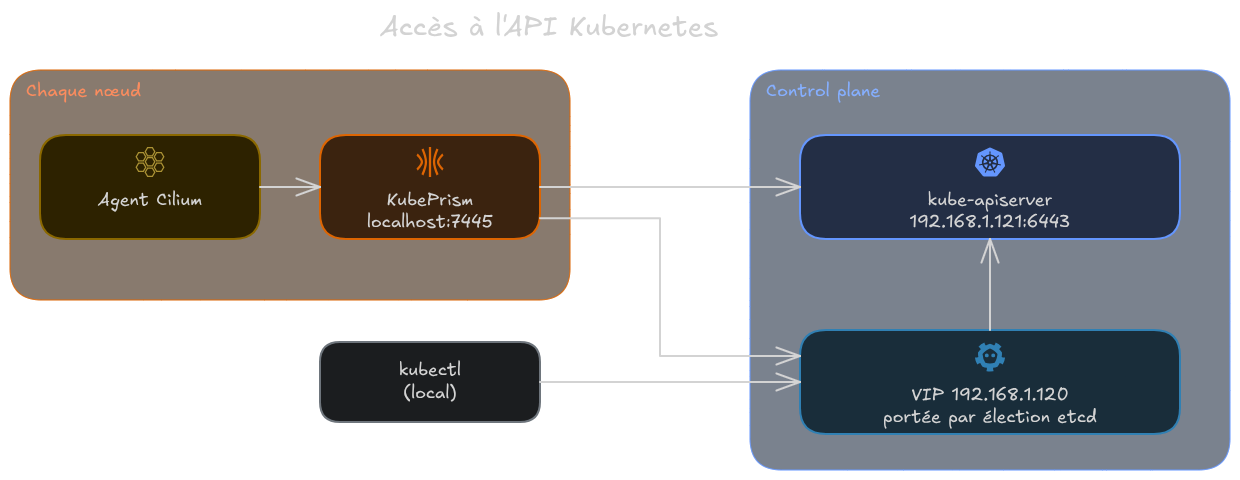
Access to the Kubernetes API
Verification
Once Cilium is installed, I check the state of the cluster on the Talos side with talosctl health. I removed the progress lines from the output, to keep only the result of each check:
| |
| |
The first address listed is the VIP and not 192.168.1.121: the control plane holding it advertises it among its addresses, and it is sorted first.
The three SKIPs come from the choices made in the patches. talosctl health does not check the Ready state of the nodes or CoreDNS when the CNI is set to none, since these checks depend on a CNI that Talos did not install itself, and it skips kube-proxy when its DaemonSet does not exist. The state of the nodes is therefore checked on the Kubernetes side:
| |
| |
All three nodes are Ready, which confirms that Cilium is working on each of them.
Pitfalls
The Talos learning curve
Getting to grips with Talos took me some time. Without a shell or SSH, none of my usual habits for troubleshooting a node apply, and everything that used to be done directly on the machine has to go through talosctl. So you have to learn a new CLI, new concepts and new naming.
A first deployment without the Talos provider
My first deployment did not use the siderolabs/talos provider: OpenTofu created the VMs, and I generated and applied the configurations by hand with talosctl. Switching to the provider brought the whole node configuration back as code, along with the rest of the infrastructure, and makes an end-to-end deployment possible in a single OpenTofu run.
A single schematic for all nodes
At first, all the nodes used the same schematic, the one containing the NVIDIA extensions. The nodes without a GPU then reported errors related to the NVIDIA drivers, since they shipped modules meant for a card they do not have. That is what led me to give each node a schematic containing only the extensions it needs.
Conclusion
The cluster is up and running, and compared to Kubespray, I no longer have an OS to administer: no package updates, no open SSH, and the node configuration cannot drift from what the code describes. A Talos update comes down to changing a version in a variable, and each node switches to the new image.
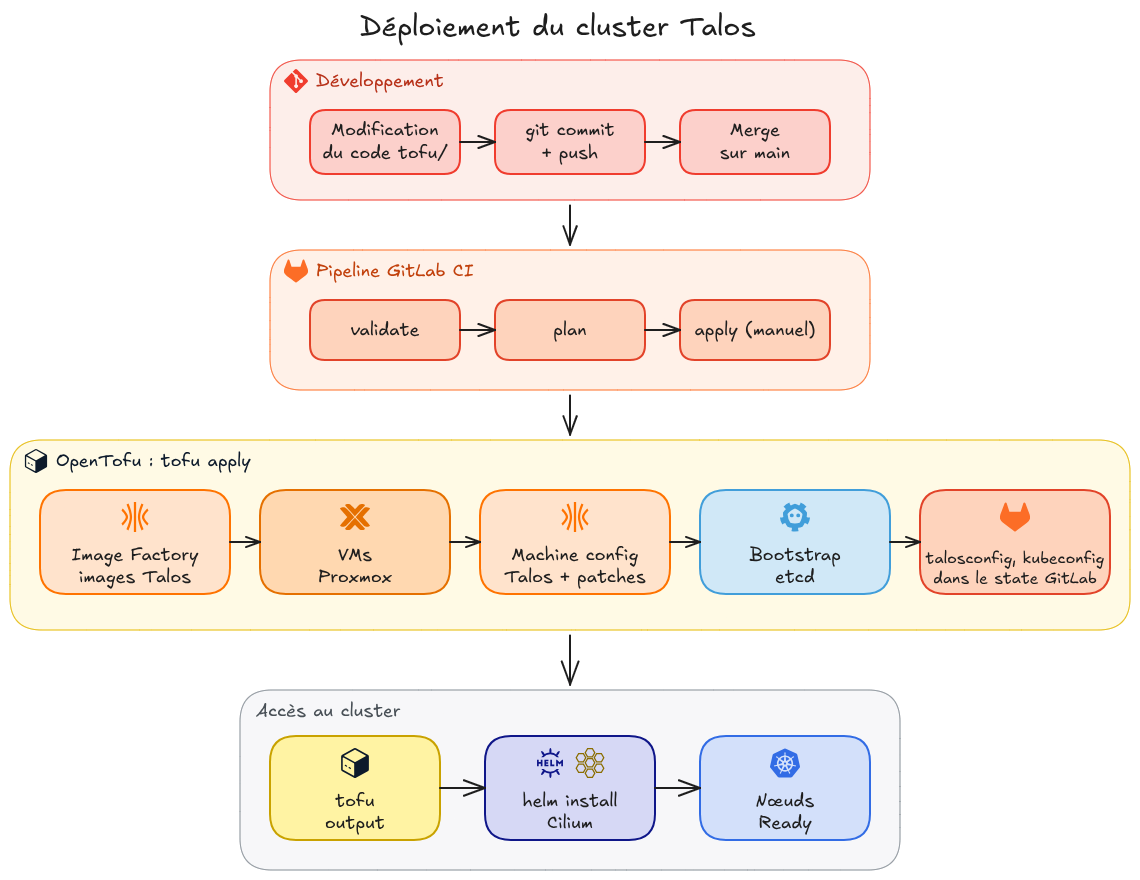
Summary of the deployment workflow
Once everything was in place, what surprised me most was how easily and quickly a Kubernetes cluster comes up. Where Kubespray ran close to 600 Ansible tasks, a single pipeline run creates the VMs, applies the configurations and bootstraps the cluster, and all that is left is to install Cilium.
The talos-gpu-01 node is already running, with its 12 GB of reserved RAM and its image containing the NVIDIA modules, but it does not see any graphics card yet. Getting the GPU from the Proxmox host all the way to the pods is the subject of part 2.