Introduction
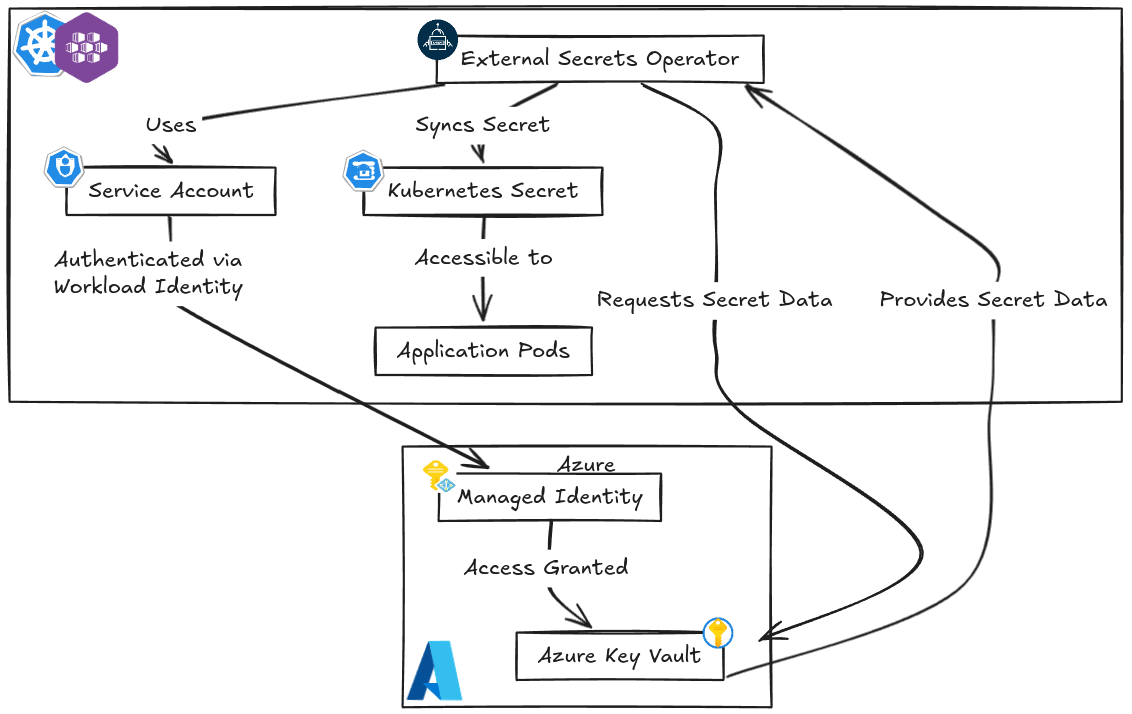
Managing secrets securely in Kubernetes is crucial to keeping our applications secure. In this article, I present secret management in Kubernetes using External Secrets Operator and Azure Key Vault with workload identity authentication, with the aim of having a robust and secure solution.
Context
I set up this solution during a one-week project as part of my master’s degree. The goal was to deploy an application stack in the cloud through a GitOps workflow. The project is available in the projet-cicd-m2-do GitLab group.
In this project, an Azure Kubernetes Service (AKS) cluster was deployed with Terraform, with the following configuration required to set up the solution:
| |
⬆️ Enables the OIDC (OpenID Connect) issuer of the AKS cluster. This means the AKS cluster generates an OIDC token issuer URL, which is essential for the trust relationship I present later in this article.
NoteOIDC is a modern authentication protocol built on the OAuth 2.0 standard. It lets applications verify a user’s identity by relying on an identity provider and retrieve information about that user securely.
| |
⬆️ Enables the Azure Workload Identity feature, so that Kubernetes pods can access Azure resources using managed identities.
Components
- External Secret Operator (ESO): a Kubernetes operator that integrates an external secret management system.
- Azure Key Vault: an Azure cloud service to store secrets and access them securely.
- Workload Identity: a method to authenticate to an Azure resource without explicitly configuring credentials.
Azure Key Vault
As soon as the AKS cluster is up, the Azure Key Vault resource has to be deployed. For this, I used Terraform, to do IaC and make my deployment reliable and automated. For the vault and the other Azure resources, I used the azurerm Terraform provider.
The following code creates the vault in the defined resource group and location, with RBAC (Role Based Access Control) enabled to manage access and the SKU (Stock Keeping Unit) set to standard. Other arguments are available, but I preferred to keep it simple given the length of the project, to get a POC quickly.
| |
Once the vault is deployed, you can put your secrets in it through the Azure UI or CLI.
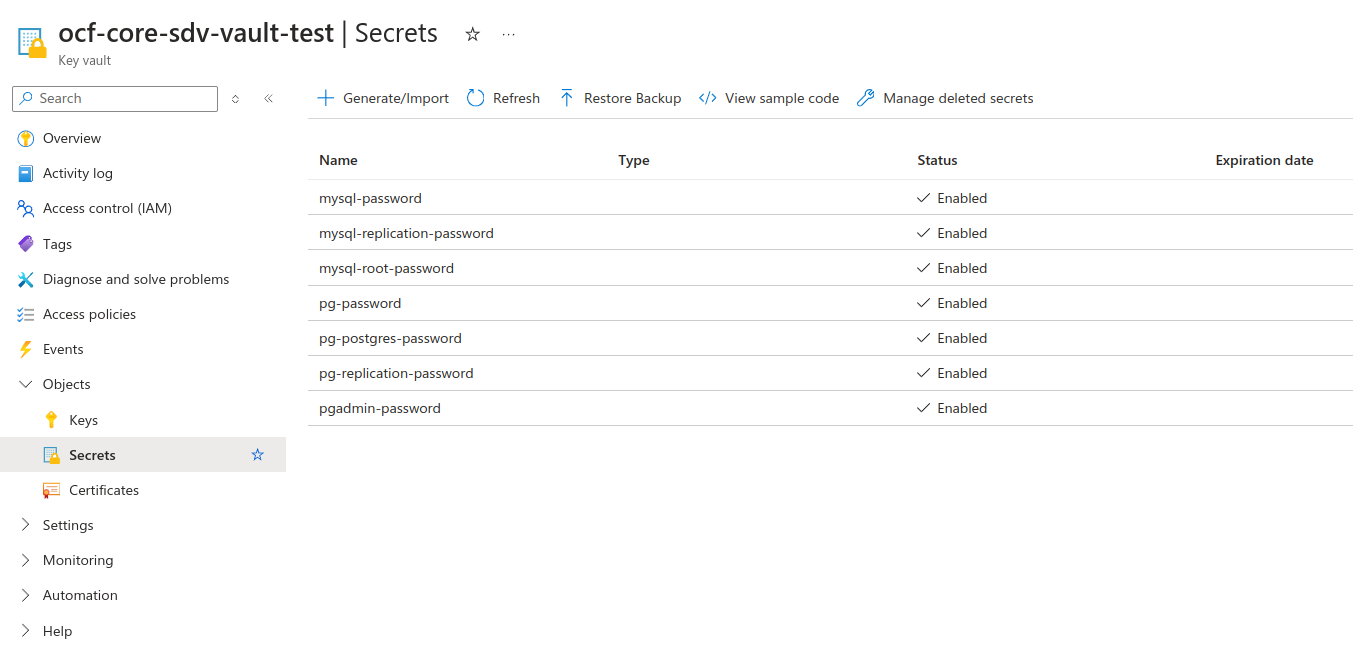
Azure Vault UI
Managed Identity
Once the vault is deployed, the role has to be assigned to the right identity so that our secrets can be accessed through it.
Kubelet Identity
When an AKS cluster is created, a user assigned managed identity is created in the resource group that Azure manages automatically and that holds the actual infrastructure resources needed to run the AKS cluster. This managed identity is called kubelet_identity, and it lets the kubelet on the cluster nodes access other Azure resources. It is through this identity that I can access the vault.
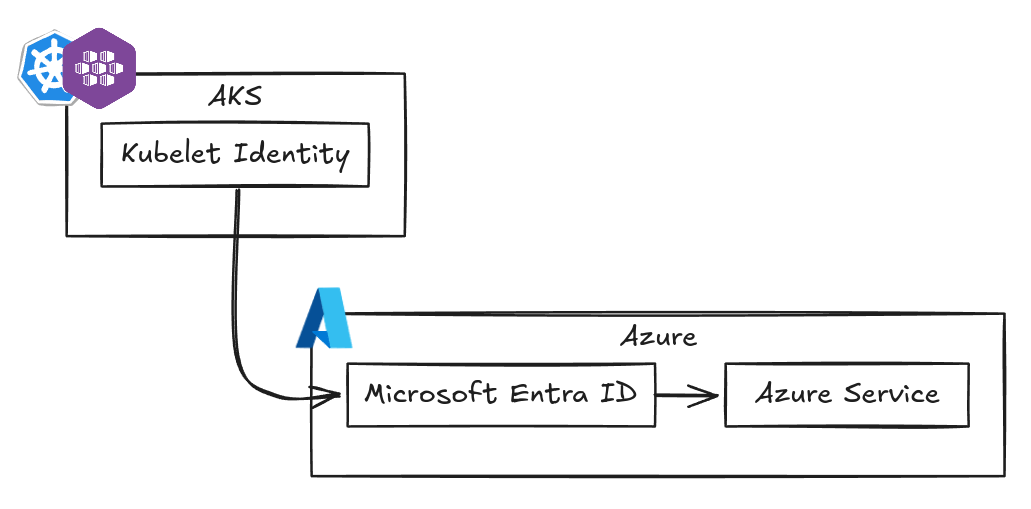
Interaction between the Kubelet Identity and Azure resources
I gave this identity read access to the secrets in the vault with the Key Vault Secrets User role:
| |
Identity federation
Once the right permissions are assigned, this identity has to be linked to a service account in Kubernetes so that the data in my Azure vault can be accessed.
To do this, you use a federated identity credential, which delegates authentication to an external identity provider, in my case the AKS cluster, and thus creates a trust relationship between AKS and the managed identity in Microsoft Entra ID.
| |
Here the audience is the intended recipient of the token issued by the OIDC issuer, the subject is the identity of the entity (the service account in my case) the federated identity is associated with, and issuer is the OIDC issuer URL of the AKS cluster.
Sequence diagram
Here is a more detailed diagram of how the connection to the Vault works with managed identity and federation:
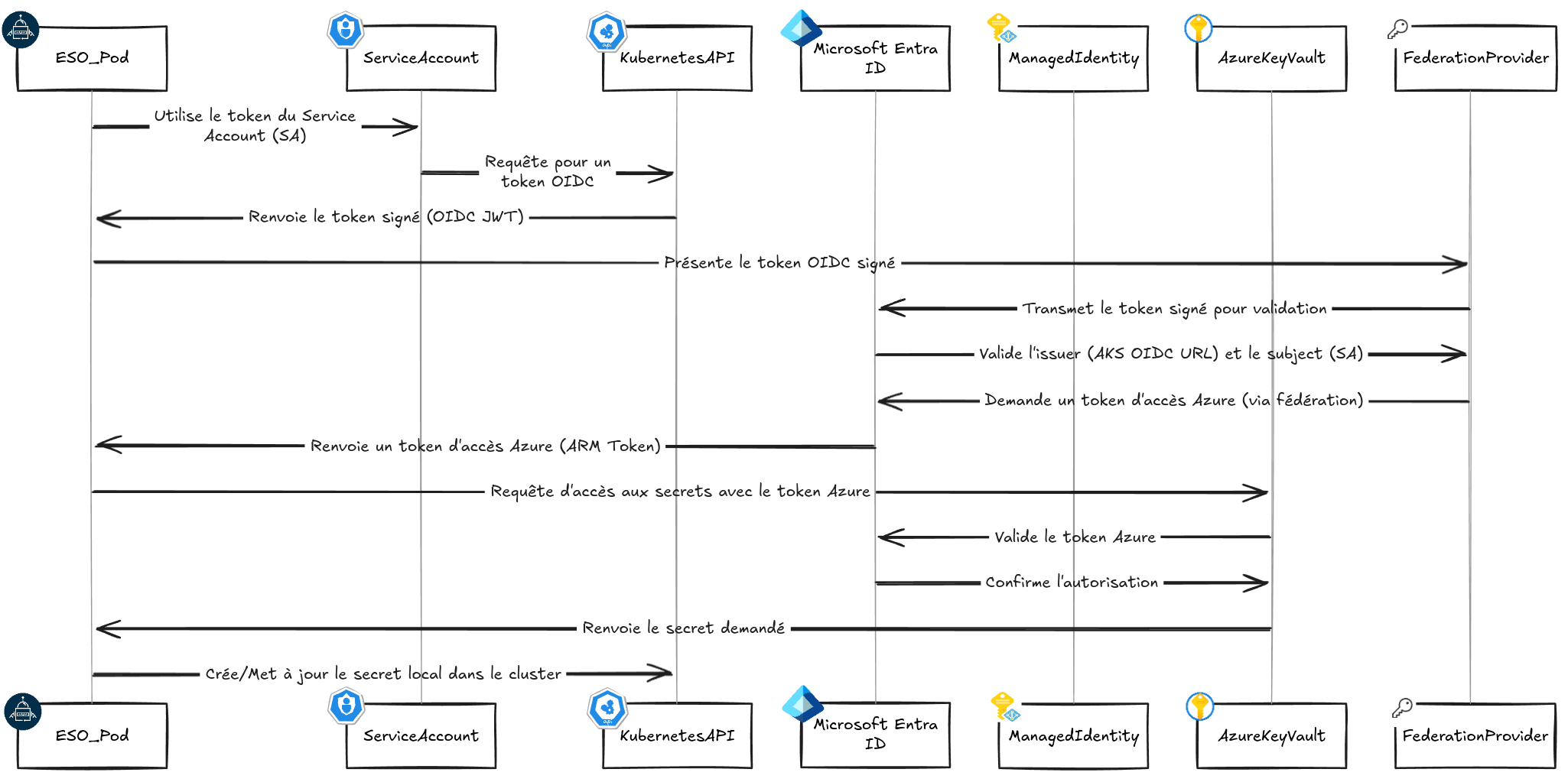
Sequence diagram of the connection to the Vault
External Secrets Operator
Next, the Kubernetes operator, External Secrets Operator (ESO), has to be set up to connect to the vault through the Azure Key Vault provider that ESO ships. For this, Custom Resource Definitions (CRDs) exist that define how to access the vault (Secret Store) and which data to retrieve (External Secret).
Secret Store
In this resource, you specify the vault URL, the Azure tenant ID, the authentication type and the associated service account. The secret store is what lets me connect to Azure Key Vault.
| |
External Secret
This resource defines which secret needs to be synced between the vault and the Kubernetes secret. You define the secret store to use, the target secret in Kubernetes and the secrets to retrieve from the Azure vault.
| |
Service Account
You also need to create the service account and add the following annotation to it, to associate it with the ID of the identity: Kubelet Identity.
| |
Deployment
For the deployment, I also used Terraform, with the helm and kubectl providers. This gives a unified infrastructure, automated end to end.
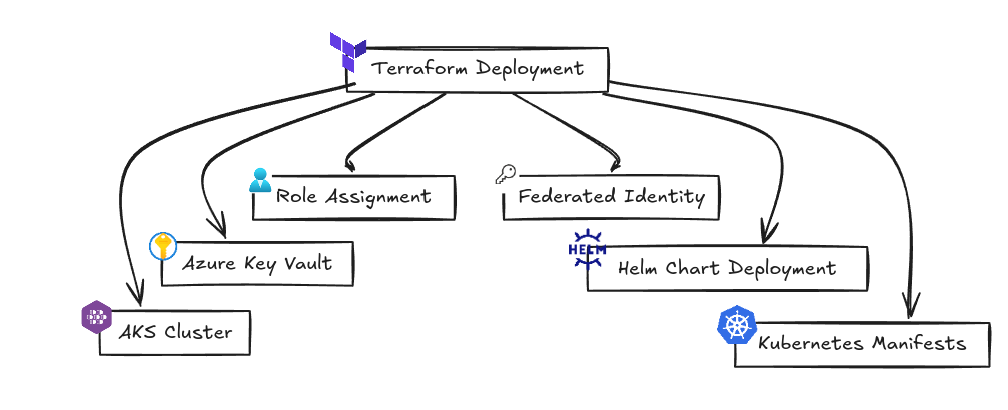
Deployment with Terraform
ESO
For ESO, a Helm chart is provided in the documentation, and it is deployed in the external-secrets namespace. This Terraform resource waits for the AKS cluster deployment to finish before being created, thanks to depend_on = [azurerm_kubernetes_cluster.aks].
| |

ESO pods deployed
Once ESO is deployed, you need to create the CRDs that configure the connection to the vault and the secrets to retrieve, as well as the service account. All of this with Kubernetes manifests, which declare the resources in YAML.
CRDs and Service Account
For the manifests, the kubectl Terraform provider lets me use variables from Terraform resources directly in the manifests to make them dynamic, as you can see in this manifest. This avoids hardcoding sensitive information in the manifests.
| |
The 3 Terraform resources are declared, and they match the 3 Kubernetes manifests / resources that must be created in the cluster to configure and use ESO.
Result
The connection to Azure Key Vault is validated, thanks to the secret-store resource.
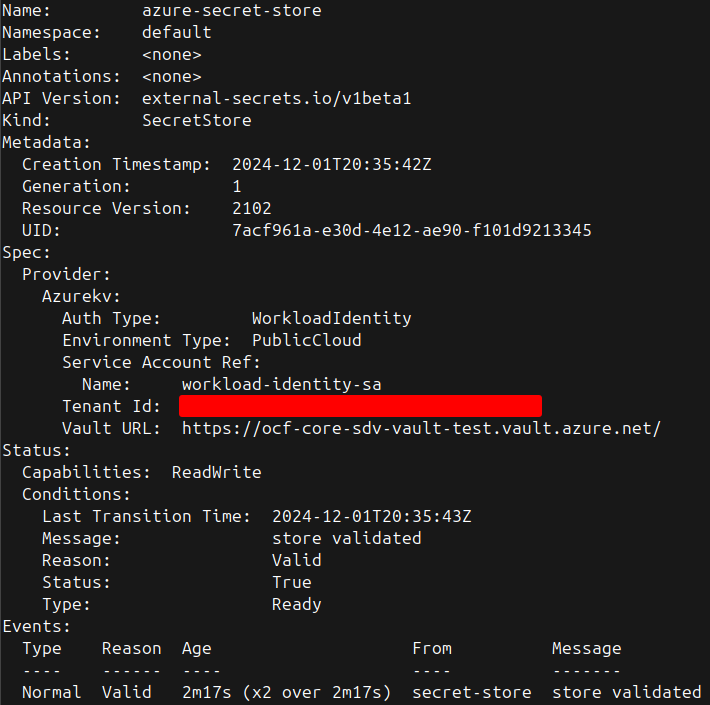
Connection to Azure Key Vault with the secret store
Once connected to the vault, the secrets are synced. You can see it on the external-secret resource, which is in the SecretSynced state. It retrieves the secrets from the vault and puts them into a Kubernetes secret.
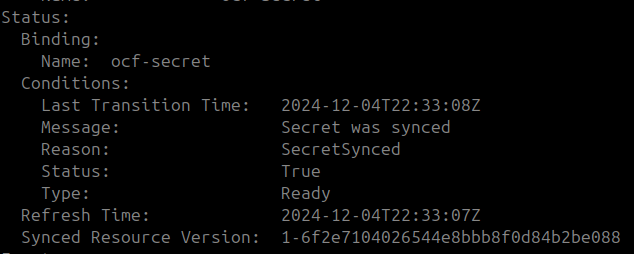
Secret sync between the vault and Kubernetes
The secret has been created and is present in Kubernetes, as you can see. For this demonstration the passwords are all the same, which of course should not be done in a production environment.
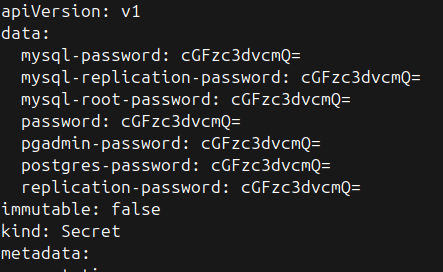
Kubernetes secret
Conclusion
Setting up this solution in a short time was a real challenge for me, as I had never done it before. I was able to work on and deepen my skills on Azure, and more specifically on the roles and identities of this cloud provider.
The goal was reached, and the complexity of the solution motivated me to write this article, first to keep a record of this work as a write-up, but also to help the people who will come across it sooner or later.