Introduction
As an SRE / Platform Engineer, one of my responsibilities is to provide reliable Helm charts to the development teams. These charts are the foundation for deploying their applications on our Kubernetes platforms. A faulty chart means impacted applications, hours of investigation, and eroded trust in the components we provide.
The trigger for this work was an avoidable incident: undocumented breaking changes were introduced and broke every deployment using the chart, which forced us to ask ourselves a fundamental question: how do we guarantee the quality of the Helm charts we provide?
Context
The problem
Managing Helm charts by hand and without automated validation carries several risks:
- Undocumented breaking changes: incompatible changes can be introduced without the consuming teams being informed.
- Syntax errors: typos or YAML errors can go unnoticed until the production deployment.
- Invalid templates: templates that do not render correctly or generate invalid Kubernetes manifests.
- Functional regressions: changes that break existing features without being detected.
- No traceability: hard to understand the history of changes and their impact.
The goal
I therefore needed a framework able to automatically validate each change before it is merged into the main branch, explicitly flag breaking changes, check the Kubernetes compliance of the generated manifests, test the expected behaviours and track changes in a usable changelog.
But it was not only about adding tools. The answer also had to be organisational: better frame contributions, make collaboration easier to follow, and make sure the quality of the chart no longer relies only on individual attention.
Components
The workflow is built around several tools and practices:
- GitLab CI/CD: orchestrates the whole validation and publication pipeline.
- Helm & plugins: the package manager for Kubernetes, with its native validation tools and its plugins.
- Git Flow: branching strategy and Merge Request process.
- SemVer: versioning to clearly communicate the type of changes.
- Keep a Changelog: a standard format to document every change.
Pipeline architecture
The GitLab CI pipeline is organised in three main stages, each with a specific goal.
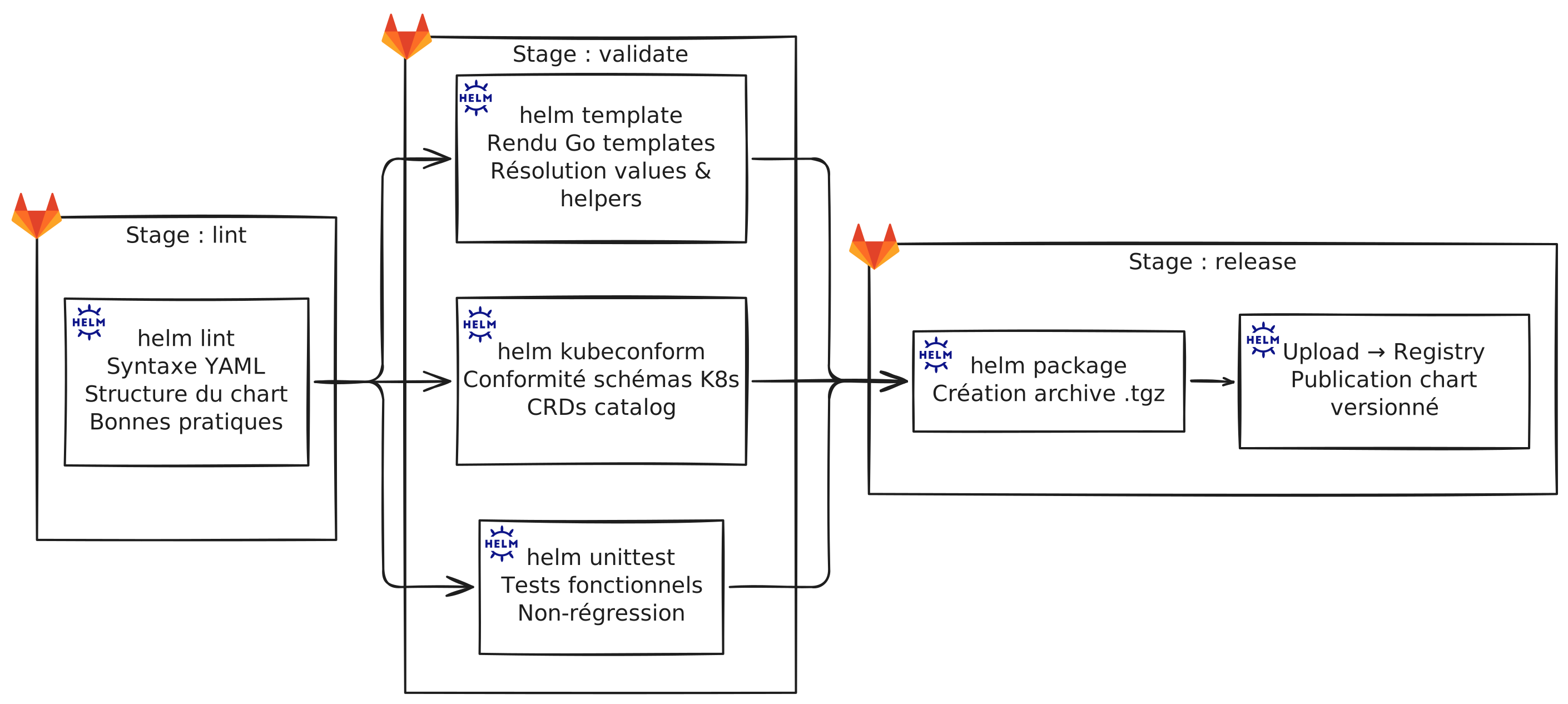
Pipeline overview
Linting
The first level of validation in the pipeline checks the syntax and overall structure of the chart with Helm’s native helm lint command. It gives fast, immediately understandable feedback. Although it does not cover every case, it removes gross errors very early, before they reach the next steps, which avoids running deeper validations and wasting time.
| |
NoteWhat Helm lint checks:
- Correct YAML syntax
- Chart structure (Chart.yaml, templates/, etc.)
- Formatting issues
- Warnings on best practices
Once the structure of the chart is confirmed, we can move on to more specific validation steps.
Template validation
To answer the question “does the chart actually render correctly with the provided values?”, I chose helm template, which renders the templates. This is often where you find missing variables, badly written conditions, or errors in Go Template functions.
It works simply: Helm interprets the templates and produces the final Kubernetes manifests, without applying them to a cluster. You get a concrete view of what would be deployed, which makes it a particularly useful step to detect rendering errors as early as possible.
| |
NoteWhat Helm template checks:
- Correct rendering of Go templates (variables, functions, pipelines)
- Resolution of values and of the helpers defined in
_helpers.tpl- Correct syntax of
{{- if }}conditions and{{- range }}loops- No undefined or wrongly referenced variables
Schema compliance
helm template guarantees that rendering works, but not that the result is acceptable to Kubernetes. That is precisely why I chose to use Kubeconform. This tool was selected because it is fast, easy to integrate into a CI, and very effective at validating manifests against known schemas.
It compares the generated resources to the expected Kubernetes schemas. So it does not only check that the YAML is well formed: it also validates the structure of the manifest, the allowed fields, the expected types and some version incompatibilities. With the CRD catalog added, it remains useful even in Kubernetes environments extended by operators.
Originally, this tool is a binary, but a Helm plugin was made so it can be used directly from the Helm CLI.
| |
Kubeconform configuration (.kubeconform):
| |
NoteWhat kubeconform checks:
- Invalid or deprecated fields
- Incorrect data types
- Missing values for required fields
- Compatibility issues with the targeted Kubernetes version
Example output:
| |
Unit tests
I added Helm Unittest because, beyond syntax and compliance, the functional behaviour of the chart had to be protected. It is the tool that lets me state explicit expectations: a name must follow a convention, a resource must exist in a given case, an image must be built with a given value, etc.
The principle is close to a classic test framework, but applied to Helm rendering. You describe a set of input values, then express assertions on the produced manifest. This approach is particularly useful to avoid silent regressions when a chart evolves and starts handling several configuration variants.
| |
Unit tests check the expected behaviour of the chart in different configurations.
Example test (tests/deployment_test.yaml):
| |
NoteThese tests check that:
- The default values produce valid manifests
- The different configurations work correctly
- Critical behaviours are preserved (non-regression)
Release management
Publication is only triggered when a Git tag is created on the main branch. This process guarantees that only tagged versions are published, and makes it possible to accumulate several changes before creating a release.
Key point: the CHANGELOG
Every Merge Request must include an update of CHANGELOG.md. This file follows the Keep a Changelog format and uses Semantic Versioning.
| |
Available categories:
- Added: new features
- Changed: changes to existing features
- Fixed: bug fixes
- Removed: removed features
ImportantIf a change introduces a breaking change, it must be:
- Clearly stated in the CHANGELOG
- Explained in the Merge Request description
- Accompanied by a migration guide if needed
Semantic Versioning
We strictly follow Semantic Versioning (MAJOR.MINOR.PATCH):
- MAJOR: breaking changes (incompatible with previous versions)
- MINOR: new backward-compatible features
- PATCH: backward-compatible bug fixes
Example:
1.0.9→1.1.0: adding resource limits (backward-compatible) → MINOR1.1.0→2.0.0: changing the structure of values.yaml (breaking) → MAJOR
Observed benefits
Since this workflow was set up, we have observed:
Quality
- Zero undocumented breaking changes in 6 months
- 90% fewer deployment errors related to the charts
- Early detection of problems (before code review)
Collaboration
- A clear process for all contributors (juniors and seniors)
- More effective code reviews (focus on logic, not syntax)
- Full traceability of changes through the CHANGELOG
Trust
- The development teams trust the stability of the charts
- Updates are less feared because the process is transparent
- Rollbacks are easier thanks to clear versioning
Productivity
- Less time spent on manual validation
- Automation of repetitive tasks
- Focus on added value rather than on checking syntax
Sequence diagram
Complete sequence diagram
Points of attention
A few lessons learned while setting this up:
Complete unit tests
Do not only test the nominal cases. Include:
- The default configurations
- Edge cases
- The different combinations of values
- Upgrade scenarios
CHANGELOG documentation
The CHANGELOG is the contract with users. It must be:
- Complete: every change must be documented
- Clear: understandable language, no unnecessary technical jargon
- Actionable: for breaking changes, state what to do
Protecting the main branch
The protection of main must be strict:
- No direct commits
- Mandatory pipeline
- Mandatory approval
- The CHANGELOG must be up to date before the merge
Protected tags
Restrict tag creation to Maintainers to avoid accidental publications.
Communication
When a breaking change happens, even a well-documented one:
- Notify the teams in advance
- Provide a migration guide
- Offer support during the transition
Future improvements
We are considering adding:
- Non-regression tests: compare the manifests generated between versions with
helm diff - Security scanning: integrate tools such as Trivy to detect vulnerabilities
- Policy enforcement: use tools such as OPA or Kyverno to validate security policies
- Deployment monitoring: track the adoption of new versions
Conclusion
Setting up a rigorous validation pipeline for our Helm charts has changed the way we work. The incident that pushed us to implement this workflow is now impossible thanks to the multiple levels of validation.
This process not only guarantees the technical quality of the charts, it also sets a clear contract with the development teams: they can trust the charts we provide, and when a breaking change is needed, it is clearly documented and communicated.
For an SRE team, providing a reliable platform is paramount. This workflow lets us keep that promise while keeping the ability to evolve and continuously improve our charts.
If you manage Helm charts for a Kubernetes platform, I strongly encourage you to set up a similar process. The initial investment quickly pays off through fewer incidents and better collaboration.
Useful resources: