Series “A Kubernetes cluster with a GPU for LLM inference”
- Deploying an immutable Kubernetes cluster with Talos on Proxmox
- Passing an NVIDIA GPU through to a Kubernetes cluster (this article)
- Running a Kubernetes cluster with GitOps and Flux (in progress)
- Self-hosted LLM inference on Kubernetes (in progress)
Introduction
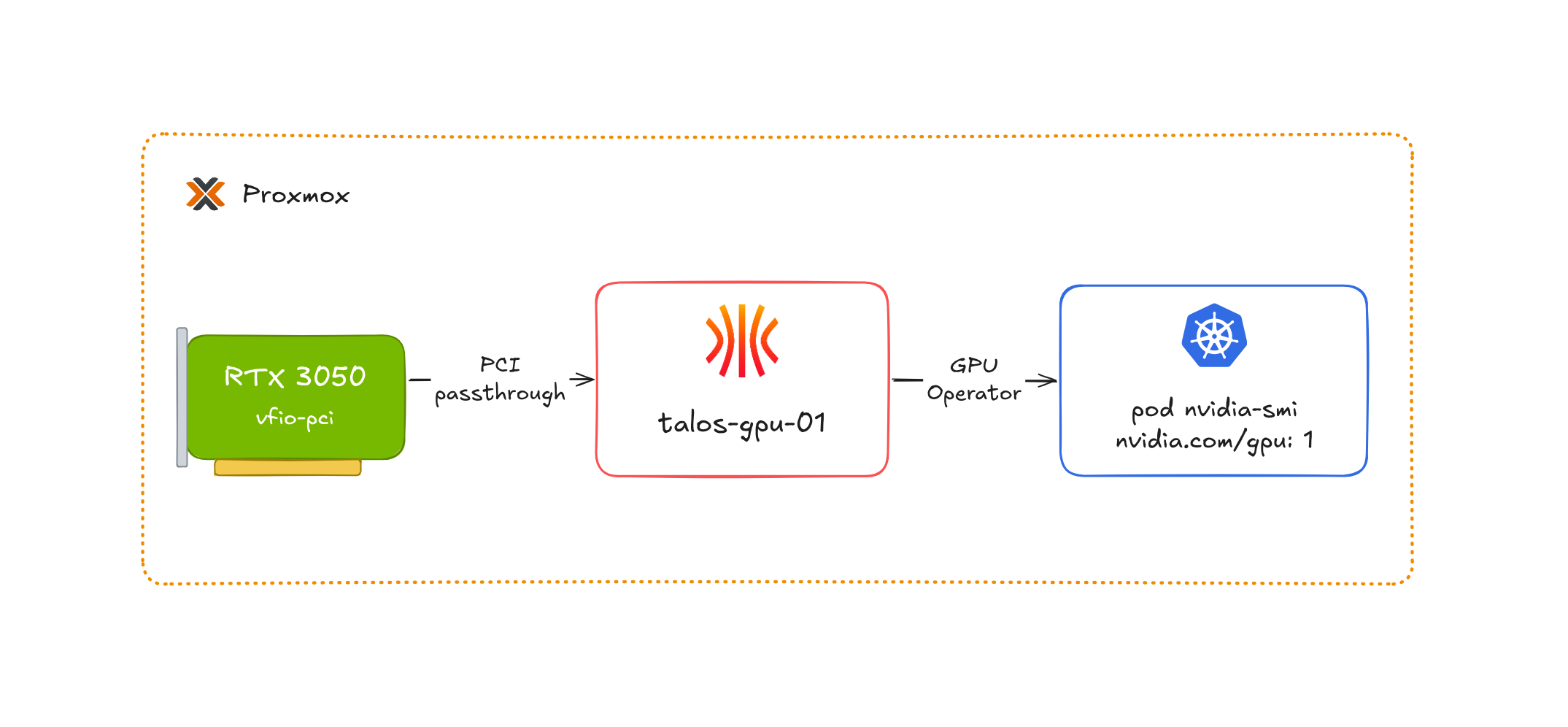
The Talos cluster deployed in part 1 is up and running, but the talos-gpu-01 node does not see any graphics card yet. In this article, I explain how I made a GeForce RTX 3050 usable by Kubernetes pods, starting from the Proxmox host. The work breaks down into four steps: detach the card from the host, attach it to the VM with OpenTofu, load the NVIDIA modules in Talos, then expose the GPU to the Kubernetes scheduler.
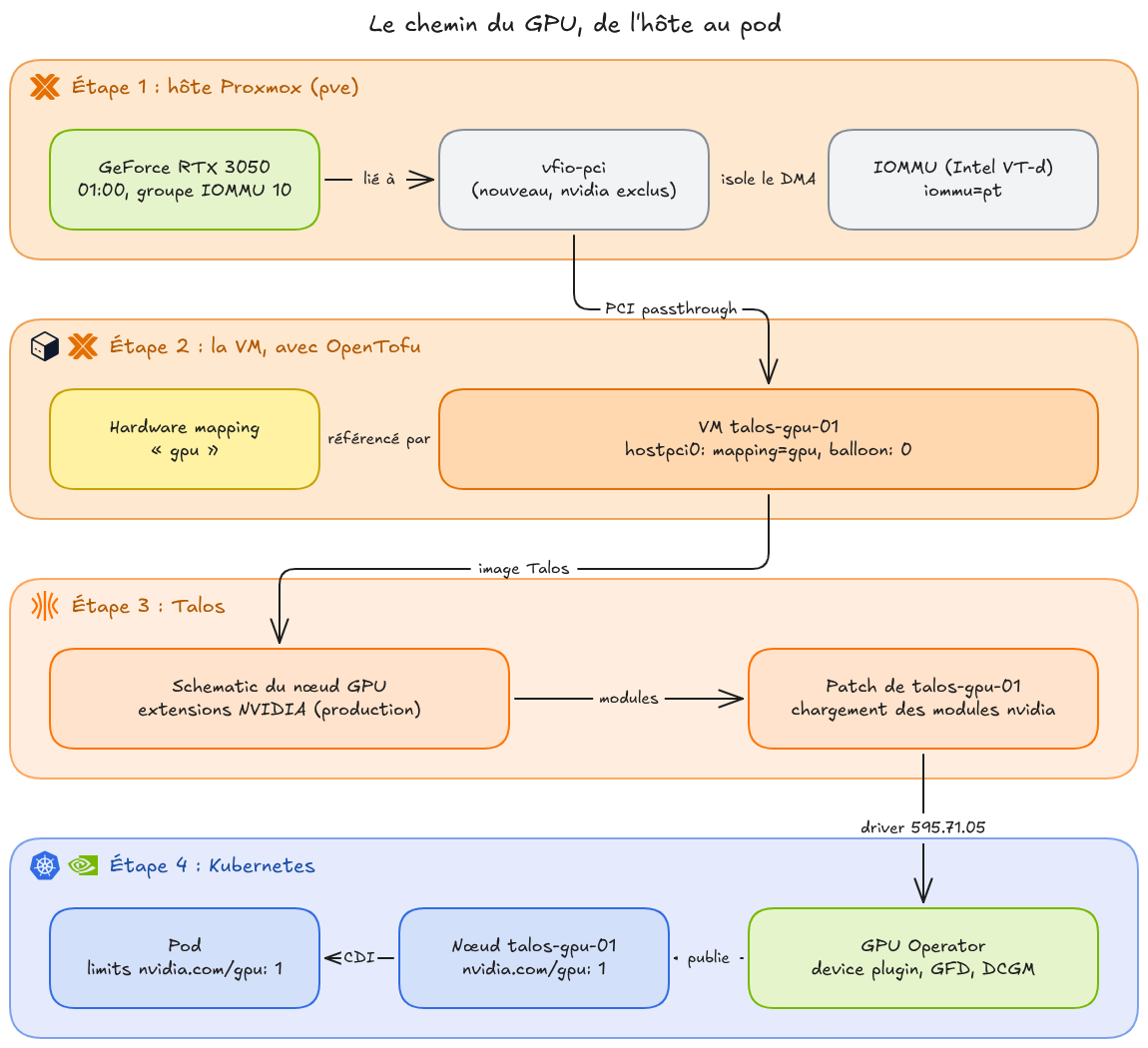
The path of the GPU, from the Proxmox host to the Kubernetes pod
Before getting to the commands, I explain what passthrough does, since that is where most of the constraints met later come from, such as disabling ballooning or checking the IOMMU groups.
Context
The end goal of this series is to run LLM inference locally in my homelab, which requires a GPU accessible from the cluster. To give a graphics card to a VM, there are two main approaches: share it between several VMs with vGPU, or dedicate it entirely to a single VM with PCI passthrough.
In my case, the choice was quick. NVIDIA only offers vGPU on its datacenter and professional lines, it is not available on a GeForce. That leaves passthrough, with a direct consequence: the card is dedicated to the talos-gpu-01 VM, the Proxmox host no longer has access to it and no other VM can share it.
The hardware used is a GeForce RTX 3050 that I had on hand.
Prerequisites
- A CPU and motherboard supporting the IOMMU (VT-d on Intel, AMD-Vi on AMD), enabled in the BIOS.
- The Talos cluster from part 1.
- A GPU that is not used for the host display. In my case, the Proxmox host runs headless and the CPU’s integrated GPU is disabled in the BIOS, so the RTX 3050 is the only graphics card in the machine.
Understanding passthrough
A PCIe device such as a GPU does not go through the CPU to read or write memory. It uses DMA (Direct Memory Access) to access RAM directly, which lets it transfer large volumes of data without keeping the processor busy.
In a VM, this causes a problem. The memory addresses seen by the guest system are guest physical addresses (GPA, Guest Physical Address), which do not match the host’s real physical addresses (HPA, Host Physical Address). For CPU accesses, the GPA to HPA translation is done in hardware by EPT (Extended Page Tables) on Intel or NPT (Nested Page Tables) on AMD, a second page table that the processor walks in addition to the guest’s. A device doing DMA does not go through this translation: if the VM’s driver gives a GPA to the GPU, the card writes at that address in the host’s RAM, which corresponds to something else entirely.
That is the job of the IOMMU (Input-Output Memory Management Unit). It does for devices what the MMU (Memory Management Unit), the processor component that translates virtual addresses into physical addresses, does for the CPU: it translates the addresses used by the device into real physical addresses, and it restricts the device to the memory areas assigned to it. The GPU passed to the VM can therefore only write into that VM’s memory.
This isolation is not done per device but per IOMMU group. A group gathers the devices that the hardware cannot isolate from one another, for example because they can communicate with each other without going through the IOMMU. The unit that can be passed to a VM is therefore the whole group, and you need to check the content of the card’s group before starting.
Finally, on the host side, the card must not be claimed by any graphics driver (nouveau or nvidia). The vfio-pci driver takes ownership of it. It is part of VFIO (Virtual Function I/O), the Linux kernel framework that gives a program outside the kernel, here QEMU, direct access to a device, relying on the IOMMU to limit what the device can reach in memory. That is how QEMU presents the card to the VM.
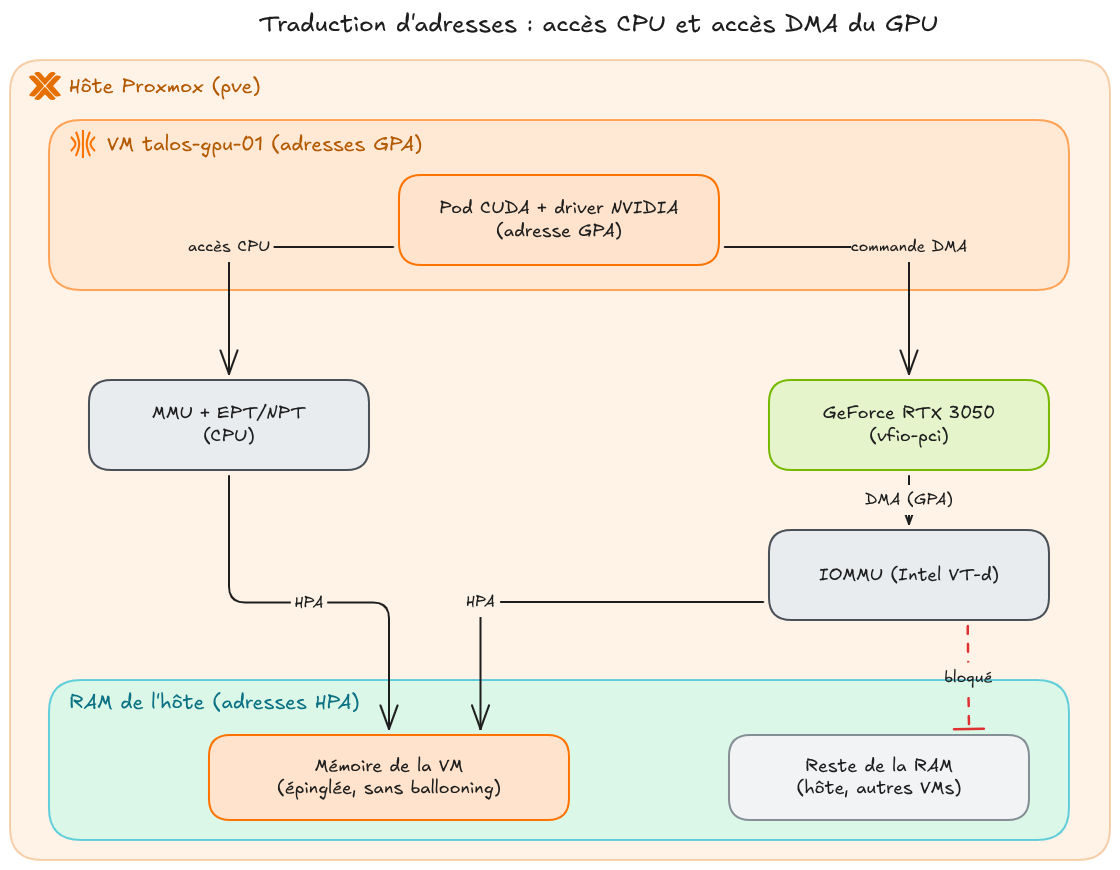
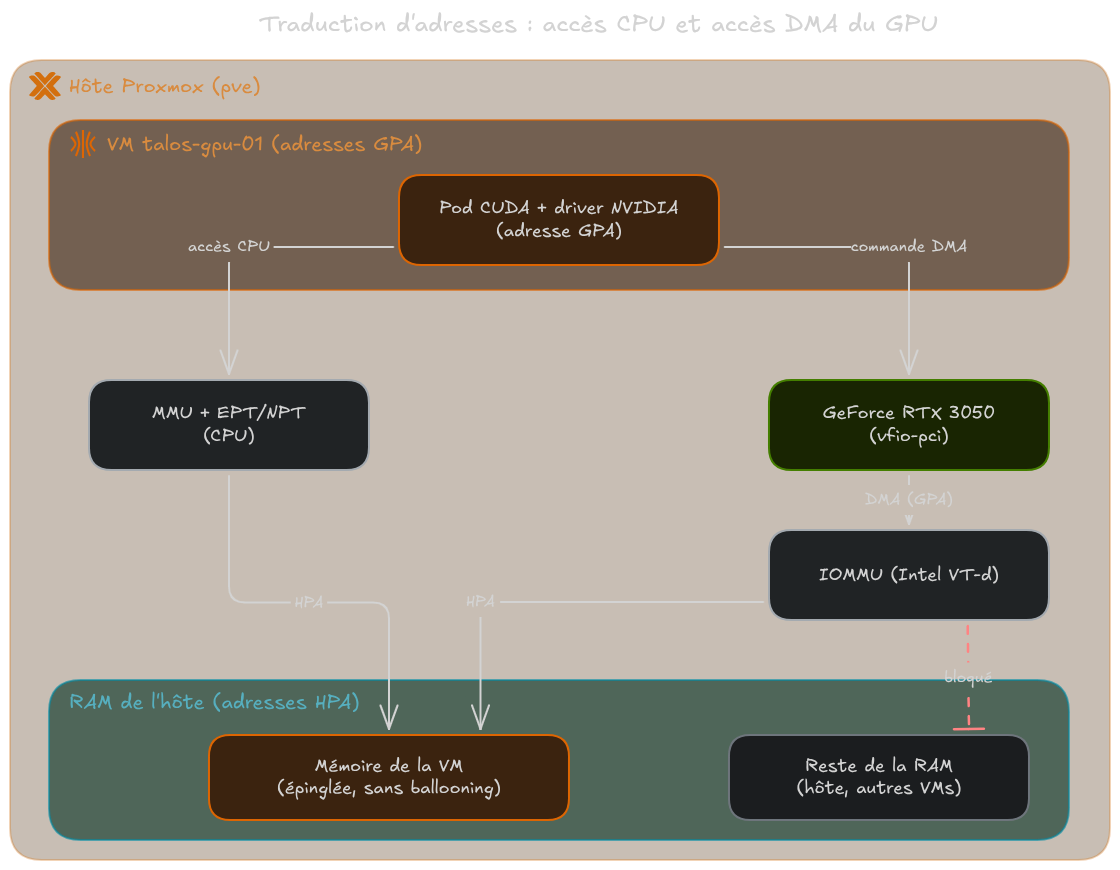
Address translation: CPU accesses and GPU DMA accesses
Why ballooning must be disabled
Ballooning lets Proxmox reclaim RAM that a VM is not using, on the fly, thanks to a driver in the guest that hands memory pages back to the host. With a device passed through VFIO, this mechanism can no longer work: the GPU can write into the VM’s pages at any time without going through the CPU, so the host has no way of knowing whether a page is still in use by the card. All of the VM’s memory is therefore pinned at boot and can no longer be given back to the host.
In the bpg/proxmox provider, ballooning is controlled by the floating argument of the memory block, and the value 0 disables it. I set it to 0 in the resource that creates the Talos nodes, so on all three nodes and not only on the GPU node:
| |
This affects sizing: the 12 GB of RAM of the talos-gpu-01 node are permanently reserved on the host, even when the node is idle.
Now that the mechanism is clear, let’s prepare the Proxmox host.
Step 1: preparing the Proxmox host
Checking the IOMMU and the groups
The first thing to do is identify the card and the IOMMU group it belongs to:
| |
Which gives in my case:
| |
The card exposes two functions: 01:00.0 for the video part and 01:00.1 for the HDMI audio controller. Both are alone in IOMMU group 10, which means the group can be passed to the VM as is, without taking any other host device along.
If other devices shared this group, for example a USB controller, they would have to be passed to the VM too. The ACS override patch is often suggested on forums to split groups artificially, but it asks the kernel to ignore an isolation that the hardware does not guarantee, since the devices in the group can still communicate with each other. The Proxmox wiki actually presents it as a last resort, and not a risk-free one.
Binding the card to vfio-pci
I configured the Proxmox host so that vfio-pci claims the card before any other driver. This part is not managed by my OpenTofu code, I did it directly on the Proxmox host.
According to the Proxmox documentation, the IOMMU is enabled by default on Intel from kernel 6.8, so the intel_iommu=on option found in many guides is no longer needed. The only useful parameter is iommu=pt, which limits address translation to the devices passed to a VM and can improve performance for the others.
Kernel parameters are passed through the command line that GRUB, the host’s bootloader, hands to the kernel at every boot. When the host boots with GRUB, which is my case, it is set in /etc/default/grub:
| |
GRUB_CMDLINE_LINUX_DEFAULT applies to normal boot entries, but not to recovery mode. quiet is present by default on Debian and Proxmox: it reduces the kernel messages displayed on screen during boot, without changing what is recorded in the logs.
The host’s dmesg confirms that the IOMMU is active, with the requested passthrough mode, and that the devices are split into IOMMU groups:
| |
The VFIO modules are loaded at boot through /etc/modules: vfio for the core of the framework, vfio_iommu_type1 to drive the IOMMU, and vfio_pci for PCI devices:
| |
For vfio-pci to reserve the card, I give it the IDs of both functions, the video part 10de:2507 and the audio part 10de:228e:
| |
The disable_vga=1 option prevents vfio-pci from exposing the card’s legacy VGA resources to the host. On top of that, I block the NVIDIA graphics drivers on the host so that none of them claims the card at boot:
| |
Changes to /etc/modules and /etc/modprobe.d/ only take effect after regenerating the initramfs (update-initramfs -u -k all), and changes to /etc/default/grub after an update-grub. After rebooting the host, the check is done with:
| |
Which gives in my case:
| |
Both functions are claimed by vfio-pci. The Kernel modules line lists the drivers able to handle the card, not those that are loaded: nouveau and nvidiafb are blocked and do not show up in lsmod.
WarningAs long as
lspci -nnkdoes not showKernel driver in use: vfio-pcion both functions, there is no point going further. The VM may boot, but the card will not be usable.
The host is ready, the card can now be attached to the VM.
Step 2: attaching the GPU to the VM with OpenTofu
Why a hardware mapping and not a PCI ID
The bpg/proxmox provider offers two ways to declare a device in a VM’s hostpci block: its raw PCI ID with the id argument, or a hardware mapping declared at the Proxmox cluster level with the mapping argument.
The provider documentation states that id is not compatible with API token authentication and requires the root account with its password. All my IaC authenticates with the token of the terraform@pve user, so I went with the mapping, which was the only option without changing the provider’s authentication.
The mapping is declared with the proxmox_hardware_mapping_pci resource:
| |
The values are set in the variables:
| |
The path is declared without a function number (0000:01:00 rather than 0000:01:00.0), which covers both functions of the card at once.
The iommu_group and subsystem_id arguments are optional for the API, but without them Proxmox shows the mapping as incomplete in the UI. So I filled them in from the output of lspci -nnv -s 0000:01:00 and find /sys/kernel/iommu_groups -type l.
Proxmox privileges
The role used by OpenTofu needs three extra privileges:
| |
- Mapping.Audit: read existing mappings.
- Mapping.Modify: create, modify and delete a mapping.
- Mapping.Use: attach a mapping to a VM, on top of the usual VM modification rights.
Without Mapping.Use, the mapping is created but attaching it to the VM fails.
The hostpci block
On the VM side, a single resource serves all three Talos nodes. The hostpci block is therefore dynamic: it is generated from each node’s hostpci list, which defaults to []. The two nodes without a card thus have no device attached.
| |
In part 1, I mentioned a sixth validation on the talos_nodes variable. Here it is, it checks that each hostpci.mapping matches a declared mapping:
| |
A typo in the mapping name is thus caught at plan time, and not as an API error in the middle of the apply.
Once the pipeline has run, the VM configuration on the Proxmox side reflects what was declared:
| |
| |
The device is referenced by the mapping name and not by its PCI address, and balloon: 0 matches the floating = 0 of the memory block.
The card is now attached to the VM, it remains to make it usable by Talos.
Step 3: the NVIDIA modules in Talos
A schematic dedicated to the GPU node
As explained in part 1, the NVIDIA extensions are not in the base image: the nodes without a card reported module loading errors at every boot. The talos-gpu-01 node therefore uses its own schematic:
| |
This schematic adds two extensions to qemu-guest-agent: nvidia-open-gpu-kernel-modules-production for the drivers, and nvidia-container-toolkit-production so that the container runtime knows how to expose the card to pods.
NoteI use NVIDIA’s open source drivers. They support GPUs from the Turing architecture onwards, which includes the RTX 3050 (Ampere). On older hardware, you need the proprietary extensions.
Loading the modules
The extensions ship the kernel modules but do not load them. That is the job of a machine config patch, placed at the node level and not at the worker/ level:
| |
This patch uses the nodes/ level presented in part 1: placed under worker/, it would also be applied to talos-worker-01, whose image does not contain the extensions.
The list of modules comes from the Talos documentation. The nvidia_uvm module is the one CUDA uses to manage unified memory.
Applying and checking
The schematic and the patch are deployed by the GitLab CI pipeline described in part 1, like the rest of the node configuration. I then check that the extensions are present in the node’s image:
| |
Which gives the following result:
| |
Both NVIDIA extensions are at version 595.71.05, the driver number, and the schematic ID is the one declared for this node. The four modules from the patch must then be loaded:
| |
| |
Finally, the /proc/driver/nvidia/version file only exists if the nvidia module is loaded, and it gives the exact driver version:
| |
| |
The Open Kernel Module mention confirms that the open source drivers are the ones running.
The driver is loaded in the VM, the last step is to make it known to Kubernetes.
Step 4: exposing the GPU to Kubernetes
Modules loaded on the node are not enough. The Kubernetes scheduler only knows about CPU and memory, and for it to allocate a GPU to a pod, an nvidia.com/gpu extended resource has to be published on the node by a device plugin. A device plugin is a component running on the node that declares the available GPUs and their state to the kubelet, then chooses which card to assign to each pod that requests one.
NVIDIA GPU Operator
To do this, I used the NVIDIA GPU Operator rather than the NVIDIA device plugin alone, for two reasons: it is the method described in the Talos documentation, and the operator also deploys the DCGM exporter, which lets me collect the GPU metrics in Prometheus.
By default, the operator installs the drivers and the container toolkit on the nodes itself, but on Talos these two components are already provided by the system extensions. They must therefore be disabled to avoid conflicts, as the Talos documentation states:
| |
- driver.enabled=false and toolkit.enabled=false: the drivers and the toolkit come from the Talos extensions.
- hostPaths.driverInstallDir=/usr/local: the Talos extension installs the driver files in
/usr/local, while the operator looks for them in/run/nvidia/driverby default. - dcgmExporter.serviceMonitor.enabled=true: creates the
ServiceMonitorthat lets Prometheus collect the GPU metrics. - The namespace must allow privileged pods, because the operator’s components access the node’s hardware.
NoteThe Talos documentation requires a GPU Operator version greater than or equal to
v26.3.1.
I did not need a nodeSelector to target the GPU node. The operator first deploys Node Feature Discovery on all nodes, which detects the PCI devices of each one. The operator then adds the nvidia.com/gpu.present=true label to the nodes that have an NVIDIA card, and only deploys its components (device plugin, DCGM exporter, validation) on those nodes:
| |
| |
Only the NFD workers run on all three nodes, all the NVIDIA components are on talos-gpu-01. The nvidia-cuda-validator pod in Completed is expected: it runs a test CUDA program on the card, then stops.
Checking the allocation
The nvidia.com/gpu resource must appear in the node’s capacity:
| |
| |
The talos-gpu-01 node exposes one GPU, the other two nodes do not have the resource. The labels added to the node by GPU Feature Discovery also give the details of the card as seen by Kubernetes:
| |
| |
The nvidia.com/cuda.runtime-version.full=13.2 label gives the highest CUDA version supported by the driver, which is used to choose the image of the test pod.
To validate the whole chain, I run a test pod that executes nvidia-smi (NVIDIA System Management Interface), the command line tool shipped with the driver that shows the visible cards, the driver version, memory usage and running processes. If the command sees the card from inside a container, the driver, the runtime and the allocation all work:
| |
The nvidia.com/gpu: 1 field in the limits is enough: the pod requests the resource published by the device plugin, so the scheduler can only place it on talos-gpu-01, and the GPU is reserved for it as long as it runs.
The Talos documentation also adds runtimeClassName: nvidia to its test pod, to go through the NVIDIA runtime that the nvidia-container-toolkit extension declares in containerd. On my cluster, this is not needed, because CDI (Container Device Interface) is enabled in the GPU Operator:
| |
| |
With CDI, the device plugin tells containerd which device files and which driver libraries to add to the container, and containerd injects them itself with its default runtime. This is also how the nvidia-smi binary, absent from the nvidia/cuda image, ends up in the container. According to the NVIDIA documentation on CDI, this is the default behaviour since version v25.10.0 of the GPU Operator, and runtimeClassName: nvidia is only still needed for containers that access GPUs through the NVIDIA_VISIBLE_DEVICES environment variable without going through the device plugin, such as monitoring agents.
Once the pod has finished, its logs contain the output of nvidia-smi:
| |
| |
The container sees the RTX 3050 with its 8 GB of memory, the 595.71.05 driver provided by the Talos extension and CUDA 13.2. The whole chain works, from vfio-pci on the Proxmox host all the way to the pod.
Conclusion
The GPU can now be allocated by the scheduler: the cluster exposes an nvidia.com/gpu resource on the talos-gpu-01 node, and a pod can request it just like it would request CPU or memory.
There is only one nvidia.com/gpu resource in the whole cluster, which means only one pod at a time can use the card. To share it between several pods, the GPU Operator offers time-slicing, where pods take turns on the card, and NVIDIA also offers MPS (Multi-Process Service), which runs the CUDA processes of several pods on the card at the same time. These are options I have not set up yet.
For my part, this stage taught me a lot about hardware. My knowledge of virtualisation had so far stayed at a fairly high level, that of the hypervisor, and I did not know the low-level mechanisms that passthrough relies on, such as device I/O, DMA, the MMU or the IOMMU.
At this point, the infrastructure is fully described in OpenTofu, but everything running in the cluster was installed with helm install commands run by hand. It is the same configuration drift problem that Talos solves at the OS level, showing up one floor higher. Part 3 therefore sets up GitOps with Flux before going further towards inference.